

Interpreter Intelligence Guide for Providers

Interpreter Intelligence Guide for Providers
Login to your account or reset your password on the web portal
Logging Into Interpreter Intelligence:
Log into Interpreter Intelligence to accept, decline, view, or close jobs here: Interpreter Intelligence.
In most cases, your username is the email address associated with your Interpreter Intelligence account.
Need to reset your password?
-
On the Interpreter Intelligence login page, select “Did you forget your password?” located on the right side of the screen.
-
Enter your username. Interpreter Intelligence will send a password reset email to the address on file.
-
Open the email and select the link provided to create a new password.
Locked out of your account?
If you are unable to reset your password or are locked out, please email coordinators@deafservicesunlimited.com for assistance.
If DSU provides you with a temporary password, be sure to update your password immediately after regaining access to your account.
Update your profile and availability on the Interpreter Intelligence web portal
Review assignment requests and details on a mobile device
Accept or decline assignments on a mobile device
View Job Information and Prep Materials
Find the relevant job under your job queue and view the job in full.

On the upper right hand side, relative attachments and prep materials will be listed and can be viewed or downloaded for your use. Be sure to scroll through the job in its entirety for additional appointment details and reminders.

Accept or decline assignments on the web portal
Close jobs and submit them for payment on a mobile device
Close jobs and submit them for payment on the web portal
Interpreter Intelligence Portal
Access PortalLogin to Interpreter Intelligence to view your provider dashboard. From there you can easily review requests, accept or decline assignments, check assignment details, and submit invoices.
Video Tutorials
Frequently Asked Questions
What are my login credentials?
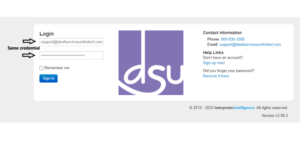
If you are logging into Interpreter Intelligence for the first time, both your username AND password will be the email address associated with your Gridcheck account. The password field is case sensitive.
Example: Username: email@emailaddress.com, Password: email@emailaddress.com
Once you login for the first time, you will be prompted to change your password.
What is DSU’s Interpreter Intelligence token?
DSU’s Interpreter Intelligence token is “dsu.” You will be asked to provide the token when you log into Interpreter Intelligence.
How do I invoice for my assignments in Interpreter Intelligence?
Closing a job in Interpreter Intelligence is the equivalent to submitting an invoice. When you close out an assignment you will be prompted to verify start and end times and add any pre-approved incidentals like mileage or travel time.
How can I keep track of my invoices and payments?
Each job you close and invoice for payment comes to DSU for verification and approval. Once your invoice has been approved, it will be available in your remittances list under the Receivables tab of your Interpreter Intelligence dashboard. All jobs submitted for payment will be verified on a rolling 2-week basis. Please check your Payment Schedule PDF for pay dates!
What if my rate is incorrect in my Interpreter Intelligence profile?
If the rates in your profile are incorrect, please submit a support request to our support team (below) or reach out to your assigned coordinator to discuss a specific assignment.
Why isn’t my closed job appearing on my Receivables tab?
Closed jobs will only show up on your II Receivables tab once they have been approved by the DSU team. Our billing team reviews remittances once a week so if you don’t see a closed job listed yet, it will appear once it’s been approved.
When I accept a job request, am I then assigned to the job?
When coordinating providers for open assignments, DSU will initially reach out to you via an emailed job request. Email requests may be sent to multiple interpreters to gauge availability. Email requests include both “accept” and “decline” buttons, which relay your availability to DSU via the Interpreter Intelligence scheduling platform.
Selecting “accept” lets DSU know that you are available for the assignment, but you may or may not be assigned when you “accept.” If you are assigned and confirmed, the assignment will appear on your Interpreter Intelligence dashboard calendar, and you will receive an emailed confirmation with assignment details.
How do I know if I have a new assignment?
If you are assigned and confirmed, the assignment will appear on your Interpreter Intelligence dashboard calendar, and you will receive an emailed confirmation with assignment details. If you are unsure if you have been assigned, you can always contact coordinators@deafservicesunlimited.com and the coordination team will let you know.
When do I invoice – or “close” – an assignment in Interpreter Intelligence?
Please invoice for your assignments by via the Interpreter Intelligence dashboard (by closing the assignment) as soon as the assignment is completed. Assignments should be invoiced no later than Mondays at 12:00 PM CST for the previous week’s assignments (Monday through Sunday).
Any assignments not invoiced by that time will be closed by DSU’s billing team, and will be paid on the same pay cycle.
For support on closing jobs, please contact our coordination team at coordinators@deafservicesunlimited.com.
I need additional help with Interpreter Intelligence – what do I do?
Feel free to reach out to our team at coordinators@deafservicesunlimited.com for additional questions! Please include as much detail and supporting information (screenshots, attachments, etc.) as you can.